mozgi
Seedance 2.0
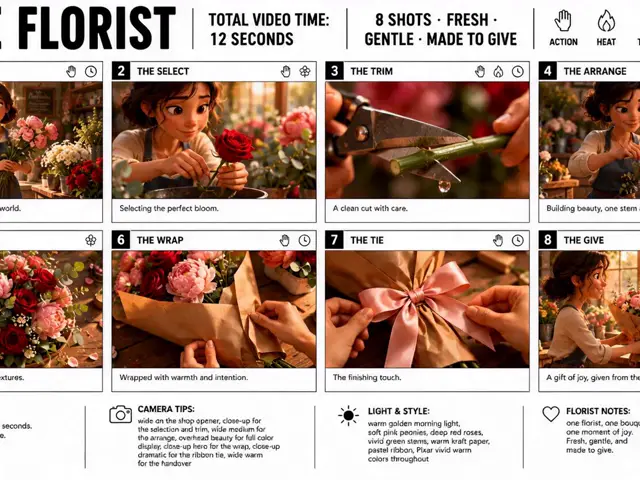
A 15-second video built from a 3×3 nine-panel reference grid, each panel expanded to full screen while keeping the character and style consistent
Prompt
Reference @image1 Shared 3×3, 9-panel reference image
[CONDITION DEFINITION]
Use the attached 1:1 square reference image with 3 columns × 3 rows and 9 panels as a storyboard for a video of approximately 15 seconds. Do not animate the entire reference image as a 3×3 split screen; instead, present each panel individually as a normal full-screen shot. Use all 9 panels in the reference image without omitting, combining, repeating, or rearranging any of them. Show only one panel full-screen at a time; never show multiple panels simultaneously. If the reference image is live-action, preserve its live-action texture. If it is anime or an illustration, preserve the original style, lines, coloring, shading, and texture. Do not convert live-action to anime or anime or illustration to live-action. Do not introduce specific new clothing, expressions, poses, actions, props, or background settings in the prompt. Add natural movement suited to the content and style of each panel, guided by its composition, subject state, posture, expression, clothing, background, and atmosphere. If the 9 panels depict the same person or character, maintain their identity throughout all shots, including facial features, hairstyle, apparent age, build, clothing, and key visual traits.

[SHOT / FLOW]
Read the reference image from left to right, starting with the top row, then proceeding to the middle and bottom rows.
Shot 1|0.0–1.5 seconds
Present the top-left panel as a normal full-screen shot, adding natural movement in accordance with that panel’s composition, style, and subject state.
Shot 2|1.5–3.0 seconds
Present the top-center panel as a normal full-screen shot, adding natural movement in accordance with that panel’s composition, style, and subject state.
Shot 3|3.0–4.5 seconds
Present the top-right panel as a normal full-screen shot, adding natural movement in accordance with that panel’s composition, style, and subject state.
Shot 4|4.5–6.0 seconds
Present the middle-left panel as a normal full-screen shot, adding natural movement in accordance with that panel’s composition, style, and subject state.
Shot 5|6.0–8.0 seconds
Present the center panel as a normal full-screen shot, adding natural movement in accordance with that panel’s composition, style, and subject state.
Shot 6|8.0–9.5 seconds
Present the middle-right panel as a normal full-screen shot, adding natural movement in accordance with that panel’s composition, style, and subject state.
Shot 7|9.5–11.0 seconds
Present the bottom-left panel as a normal full-screen shot, adding natural movement in accordance with that panel’s composition, style, and subject state.
Shot 8|11.0–12.5 seconds
Present the bottom-center panel as a normal full-screen shot, adding natural movement in accordance with that panel’s composition, style, and subject state.
Shot 9|12.5–15.0 seconds
Present the bottom-right panel as a normal full-screen shot, adding natural movement in accordance with that panel’s composition, style, and subject state. End with a brief lingering moment.
Each shot should show natural movement from the very beginning, however subtle. The subject’s gaze, expression, breathing, posture, hair, clothing, surrounding objects, light, and background should move naturally from their original state in each panel.
Do not add new acting or large movements unrelated to the reference image.

[CAMERA / EDITING]
Generally preserve each panel’s original composition and sense of distance, naturally expanding it into a normal 1:1 full-screen shot.
Prioritize natural movement in the subject and background, and keep the camera stable by default. Only when necessary, add a very subtle push-in, pull-back, pan, or change in depth. Follow the timeline specified in [SHOT / FLOW] for shot order and transition times.
Switch between shots with clear cuts. Do not use morphing that dissolves the face, body, clothing, or background into the next shot. Do not retain the borders or margins separating the 3×3 image as a fixed frame in the finished video.
Decorations, lines, symbols, and effects already present in each panel may be naturally preserved as part of the original style. However, do not multiply new decorations, distort their shapes, or carry them continuously into another shot.

[SOUND]
With BGM. Add instrumental music that naturally suits the overall style, atmosphere, and pace of the video.
Do not include lyrics, singing, narration, or dialogue. If needed, add subtle ambient sounds or sound effects that do not interfere with the BGM.

[NEGATIVE]
Do not animate the entire 3×3 reference image as a split screen.
Do not use multiple screens, split screens, or a collage layout.
Do not omit, combine, repeat, or rearrange any of the 9 panels.
Do not change the specified reading order.
Do not deviate significantly from the specified timing.
Do not leave each panel static for a long time.
Do not change the identity of the same person or character.
Do not add new people, clothing, props, backgrounds, or acting unrelated to the reference content.
Do not significantly change the original expression, posture, clothing, or composition.
Do not turn live-action into anime, or anime or illustrations into live-action.
Do not dissolve or morph faces, bodies, clothing, or backgrounds between shots.
Do not multiply or distort decorations, lines, symbols, or effects, or connect them to another shot.
Avoid intense camera movement, extreme zooms, overacting, and unnecessary scene transitions.
Reference @image1 共有用3×3・9コマ参照画像
[CONDITION DEFINITION]
添付した1:1スクエアの3列×3行・全9コマの参照画像を、約15秒の動画を構成する絵コンテとして使用する。参照画像全体を3×3の分割画面のまま動かすのではなく、各コマを1つずつ独立した通常の全画面ショットとして展開する。参照画像内の9コマをすべて使用し、省略、統合、反復、並べ替えを行わない。常に1つのコマだけを全画面表示し、複数のコマを同時に表示しない。参照画像が実写の場合は実写の質感を維持する。アニメまたはイラストの場合は、元の絵柄、線、彩色、陰影、質感を維持する。実写とアニメを相互に変換しない。プロンプト側から特定の衣装、表情、ポーズ、動作、小道具、背景設定を新しく固定しない。各コマに描かれている構図、被写体の状態、姿勢、表情、衣装、背景、雰囲気を基準に、その内容と画風に適した自然な動きを補完する。9コマが同一人物または同一キャラクターを描いている場合は、全ショットを通して顔立ち、髪型、年齢感、体格、衣装、主要な外見的特徴の同一性を維持する。

[SHOT / FLOW]
参照画像の読み込み順は、左上から右方向へ進み、上段、中央段、下段の順とする。
Shot 1|0.0〜1.5秒
左上のコマを通常の全画面ショットとして展開し、そのコマの構図、画風、被写体の状態に従って自然に動かす。
Shot 2|1.5〜3.0秒
上中央のコマを通常の全画面ショットとして展開し、そのコマの構図、画風、被写体の状態に従って自然に動かす。
Shot 3|3.0〜4.5秒
右上のコマを通常の全画面ショットとして展開し、そのコマの構図、画風、被写体の状態に従って自然に動かす。
Shot 4|4.5〜6.0秒
中央段左のコマを通常の全画面ショットとして展開し、そのコマの構図、画風、被写体の状態に従って自然に動かす。
Shot 5|6.0〜8.0秒
中央のコマを通常の全画面ショットとして展開し、そのコマの構図、画風、被写体の状態に従って自然に動かす。
Shot 6|8.0〜9.5秒
中央段右のコマを通常の全画面ショットとして展開し、そのコマの構図、画風、被写体の状態に従って自然に動かす。
Shot 7|9.5〜11.0秒
左下のコマを通常の全画面ショットとして展開し、そのコマの構図、画風、被写体の状態に従って自然に動かす。
Shot 8|11.0〜12.5秒
下中央のコマを通常の全画面ショットとして展開し、そのコマの構図、画風、被写体の状態に従って自然に動かす。
Shot 9|12.5〜15.0秒
右下のコマを通常の全画面ショットとして展開し、そのコマの構図、画風、被写体の状態に従って自然に動かす。最後は短い余韻を残して終える。
各ショットは開始直後から、小さくても視認できる自然な動きを生じさせる。被写体の視線、表情、呼吸、姿勢、髪、衣服、周囲の物体、光、背景などは、各コマの元の状態から自然につながる範囲で動かす。
参照画像と無関係な新しい演技や大きな動作は追加しない。

[CAMERA / EDITING]
各コマの元の構図と距離感を基本として維持し、1:1の通常の全画面ショットとして自然に展開する。
被写体や背景の自然な動きを優先し、カメラは原則として安定させる。必要な場合のみ、ごく軽い寄り、引き、パン、奥行きの変化を加える。ショットの順番と切り替え時刻は、[SHOT / FLOW]で指定した時間軸に従う。
ショット間は明瞭なカットで切り替える。顔、身体、衣装、背景を溶かして次のショットへ変形させるモーフィングは行わない。3×3画像を区切る枠線や余白は、完成映像の固定フレームとして残さない。
各コマ内に元から描かれている装飾、線、記号、エフェクトは、元の画風の一部として自然に維持してよい。ただし、装飾を新しく増殖させたり、形を崩したり、別のショットへ連続させたりしない。

[SOUND]
BGMあり。参照画像全体の画風、雰囲気、映像のテンポに自然に合うインストゥルメンタル音楽を付ける。
歌詞、歌唱、ナレーション、台詞は入れない。必要に応じて、BGMを邪魔しない控えめな環境音や効果音を加える。

[NEGATIVE]
3×3の参照画像全体を分割画面のまま動かさない。
複数画面、分割画面、コラージュ表示にしない。
9コマの一部を省略、統合、反復、並べ替えしない。
指定された読み込み順を変更しない。
指定された時間配分から大きく外れない。
各コマを長い静止状態のまま表示しない。
同一人物または同一キャラクターを別人化させない。
参照内容と無関係な人物、衣装、小道具、背景、演技を新しく追加しない。
元の表情、姿勢、衣装、構図を大幅に変更しない。
実写をアニメ化、アニメやイラストを実写化しない。
ショット間で顔、身体、衣装、背景を溶かして変形させない。
装飾、線、記号、エフェクトを増殖、変形、別ショットへ接続させない。
激しいカメラ移動、極端なズーム、過剰な演技、不要な場面転換を避ける。
- Needs your photo: attach an image to the request — the prompt works with it.
The rights to this prompt belong to its author @ai_lifehack55. You are responsible for any commercial use — promoting AI tools, aggregators or Telegram bots: mozgi.io accepts no liability. Details →