mozgi
GPT Image 2.0
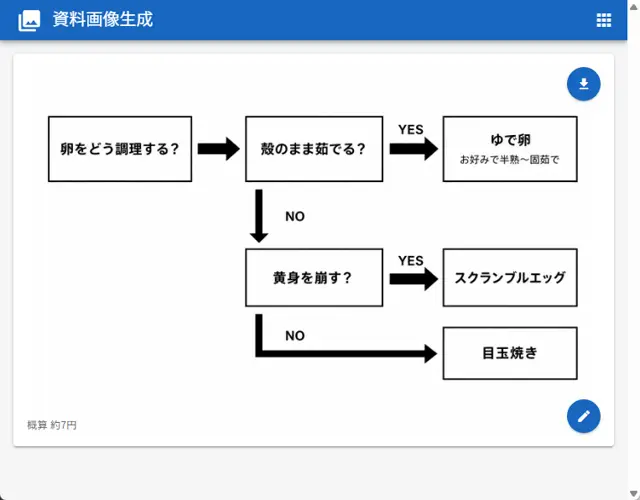
Interfaccia web che mostra un diagramma di flusso per cucinare le uova con testo giapponese
Prompt
Goal: Create a clean web-app screenshot showing a generated document image: a simple Japanese decision flowchart for how to cook eggs.

Canvas: 762×596 px desktop browser/app view. Light gray page background with a bright blue top app bar spanning the full width. The app bar contains a small white image icon at far left, the Japanese title 資料画像生成 in white, and a small white grid/menu icon at the far right. A subtle scrollbar is visible on the right edge.

Main card layout: Center a large white rounded rectangle card with a faint drop shadow, about 718×468 px, starting below the blue header. Inside the card is a black-and-white flowchart on a white field, leaving generous margins. Add two floating circular blue action buttons on the right side of the card: one near the upper-right with a white download arrow icon, and one near the lower-right with a white pencil/edit icon.

Flowchart elements: Use exactly 6 rectangular outlined boxes with white fill and black borders, connected by exactly 5 thick black arrows. All text is Japanese and bold black unless noted.
1. Left box: 「卵をどう調理する?」
2. Top middle box: 「殻のまま茹でる?」
3. Top right box: main text 「ゆで卵」 with smaller subtitle 「お好みで半熟〜固茹で」
4. Middle lower box: 「黄身を崩す?」
5. Middle right box: 「スクランブルエッグ」
6. Bottom right box: 「目玉焼き」

Flowchart connections and labels: A right-pointing arrow connects box 1 to box 2. From box 2, a right-pointing arrow labeled 「YES」 above it connects to box 3. From box 2, a downward arrow labeled 「NO」 to the right descends to box 4. From box 4, a right-pointing arrow labeled 「YES」 above it connects to box 5. From box 4, a thick path goes downward then right, labeled 「NO」 near the turn, ending with a right-pointing arrow into box 6.

Footer text: At the lower-left inside the card, add small gray Japanese text 概算 約7円.

Visual style: Minimal monochrome flowchart, clean sans-serif Japanese UI font, thick black arrows, crisp rectangular outlines, lots of white space, realistic screenshot-like UI rendering. Avoid extra boxes, extra icons, decorative colors inside the chart, watermarks, or additional explanatory text.
- Il prompt è in cinese: incollalo così com'è, il modello lo capisce.
I diritti su questo prompt appartengono all'autore @1ft_seabass. Dell'uso commerciale — promozione di strumenti IA, aggregatori, bot Telegram — rispondi tu: mozgi.io non si assume alcuna responsabilità. Dettagli →