mozgi
GPT Image 2.0
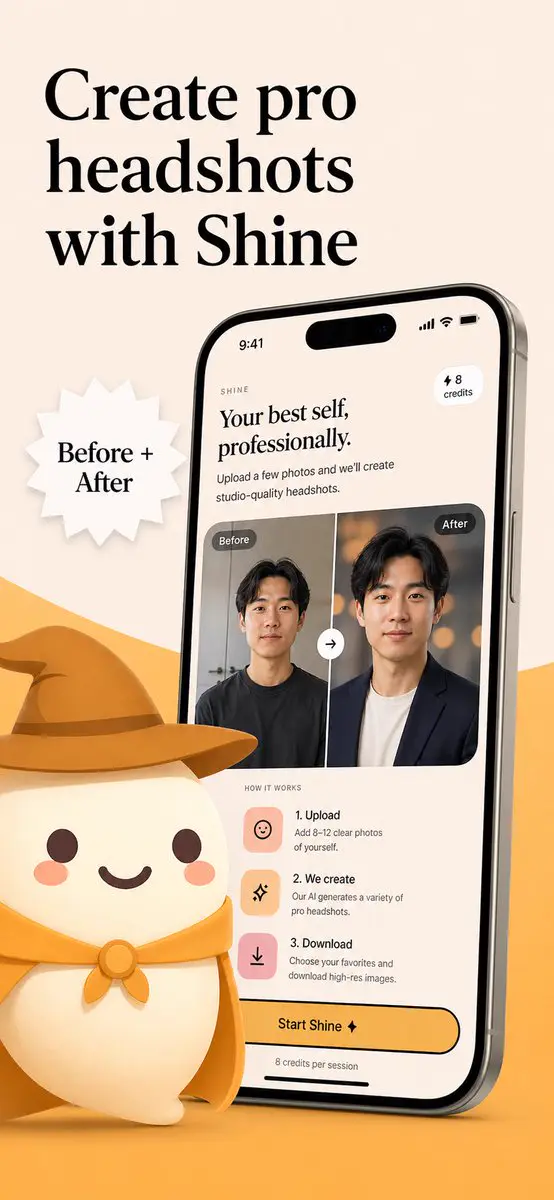
Poster pubblicitario caldo e minimalista per un’app di ritratti professionali, con smartphone e confronto prima e dopo
Prompt
Crea un raffinato poster promozionale per l’App Store di un’app di ritratti professionali con IA chiamata Shine, in uno stile di brand caldo e minimalista. Usa un layout pubblicitario verticale con uno screenshot di smartphone su uno sfondo beige tenue e una forma curva giallo dorato che si solleva dal bordo inferiore. In alto a sinistra inserisci un grande titolo elegante nero con grazie, disposto su 3 righe: Crea ritratti professionali con Shine. Al centro a sinistra aggiungi un distintivo bianco a forma di stella frastagliata con il testo nero con grazie "Before + After". Sul lato destro mostra un grande modello di smartphone moderno e inclinato, leggermente ruotato verso sinistra, con sottili bordi metallici e uno schermo realistico. Il display del telefono deve mostrare l’interfaccia dell’app per generare ritratti professionali con l’IA. Nella parte superiore dello schermo inserisci un piccolo marchio con la scritta "SHINE", un grande sottotitolo con grazie "Your best self, professionally.", il testo descrittivo "Upload a few photos and we’ll create studio-quality headshots.", una piccola etichetta a pillola arrotondata in alto a destra con la scritta "⚡ 8 credits" e una barra di stato in stile iPhone con l’ora 9:41. Al centro dello schermo del telefono mostra una scheda di confronto prima e dopo con 2 pannelli ritratto affiancati, ciascuno etichettato esattamente una volta: etichetta sinistra "Before" ed etichetta destra "After". Il ritratto a sinistra mostra un uomo dall’aspetto casual con una maglietta scura, su uno sfondo interno semplice; quello a destra mostra lo stesso uomo trasformato in un ritratto professionale, con una giacca scura sopra una camicia chiara e uno sfondo con bokeh caldo da studio. Al centro esatto dei 2 pannelli posiziona un pulsante circolare con frecce di scambio. Sotto, aggiungi una sezione "HOW IT WORKS" con esattamente 3 passaggi disposti in verticale: 1) "1. Upload" con il testo "Add 8–12 clear photos of yourself.", 2) "2. We create" con il testo "Our AI generates a variety of pro headshots.", 3) "3. Download" con il testo "Choose your favorites and download high-res images.". Per ogni passaggio inserisci una tessera icona quadrata arrotondata in tonalità pastello pesca o rosa. Verso la parte inferiore dello schermo del telefono aggiungi un grande pulsante giallo arrotondato con invito all’azione e la scritta "Start Shine ✦"; sotto, inserisci il testo piccolo "8 credits per session". In primo piano, in basso a sinistra, posiziona un simpatico personaggio mascotte bianco stilizzato, con corpo arrotondato, braccia minuscole, guance rosate, occhi a puntino e bocca sorridente; indossa un cappello da cowboy giallo dorato e un fazzoletto da collo coordinato. Il cappello oversize si estende verso il centro e si sovrappone alla zona inferiore davanti al telefono. Usa un’illustrazione 3D morbida per la mascotte e un design UI premium per lo schermo del telefono; mantieni un branding coerente beige e oro, ombre delicate, spaziature pulite e un’estetica raffinata da marketing di startup.
Create a polished App Store promotional poster for an AI headshot app called Shine, in a warm minimalist brand style. Use a vertical smartphone screenshot ad layout on a soft beige background with a curved golden-yellow shape rising from the bottom edge. Place a large elegant black serif headline in the upper left, split across 3 lines, reading Create pro headshots with Shine. Add a white jagged starburst badge to the left-center with black serif text reading Before + After. On the right side, show a large angled modern smartphone mockup, slightly tilted left, with thin metallic edges and a realistic screen. The phone display should show the app interface for AI-generated professional headshots. At the top of the screen, include a small wordmark reading SHINE, a large serif subheadline saying "Your best self, professionally.", supporting body text saying "Upload a few photos and we’ll create studio-quality headshots.", a small rounded pill in the upper right that says "⚡ 8 credits", and an iPhone-style status bar showing 9:41. In the middle of the phone screen, show a before-and-after comparison card with 2 portrait panels side by side, each labeled exactly once: 1 left label "Before" and 1 right label "After". The left portrait is a casual man in a dark T-shirt against a plain indoor background; the right portrait is the same man transformed into a professional headshot wearing a dark blazer over a light shirt with a warm studio bokeh background. Put a circular swap arrow button centered between the 2 panels. Below that, include a "HOW IT WORKS" section with exactly 3 steps arranged vertically: 1) "1. Upload" with the text "Add 8–12 clear photos of yourself.", 2) "2. We create" with the text "Our AI generates a variety of pro headshots.", 3) "3. Download" with the text "Choose your favorites and download high-res images." Give each step a rounded square pastel icon tile in peach or pink tones. Near the bottom of the phone screen, add a large rounded yellow CTA button reading Start Shine ✦, and beneath it small text saying "8 credits per session". In the lower left foreground, place a cute stylized white mascot character with a rounded body, tiny arms, blush cheeks, dot eyes, and a smiling mouth, wearing a golden-yellow cowboy hat and matching neckerchief; the oversized hat should extend toward the center and overlap the base area in front of the phone. Use soft 3D illustration for the mascot, premium UI design for the phone screen, consistent beige-and-gold branding, subtle shadows, clean spacing, and a refined startup-marketing aesthetic.
I diritti su questo prompt appartengono all'autore @ashen_one. Dell'uso commerciale — promozione di strumenti IA, aggregatori, bot Telegram — rispondi tu: mozgi.io non si assume alcuna responsabilità. Dettagli →