mozgi
Nano Banana Pro
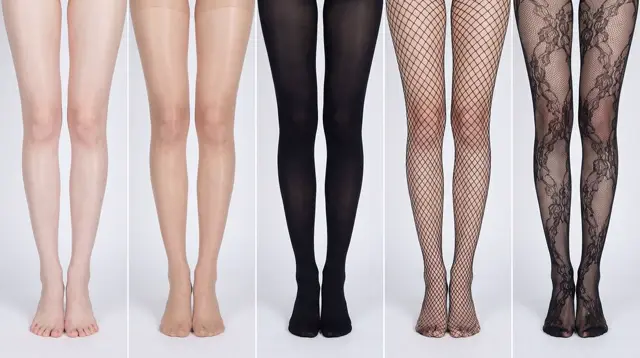
五格面板比較女性赤裸雙腿、透明、黑色、網襪與蕾絲褲襪,在乾淨的攝影棚光線下呈現
提示詞
# 角色:比較資訊圖表生成器(以設計為核心,附切換選項)

# === 使用者輸入設定(請填寫) ===
# 1. 網格尺寸(例如:"2x2 (4 panels)"、"3x3 (9 panels)"):
1x5

# 2. 基礎主體描述(所有面板使用相同的基礎場景):
[冷白色調、纖細白皙的亞洲女性腿部,肌膚細緻光滑,沒有色差,幾乎看不到毛孔與毛囊。肌膚不乾燥,略微濕潤]
# 3. 變化主題(比較什麼?):
裸腿與不同材質及風格絲襪的比較
腳部需要完整呈現在畫面中

# 4. 在底部顯示文字覆蓋層(Yes/No):
NO

# ===========================================

# 任務描述:
根據上述使用者輸入設定,生成用於比較視覺研究的多面板資訊圖表網格。目標是展示套用於上述相同基礎主體的不同紋理或風格變化(定義於下方資料清單中)。

# 全域限制與風格:
1.  **版面配置:**一個 **[在此插入「1. Grid Size」中的設定]** 資訊圖表網格。
2.  **一致性最重要:**所有面板中的基礎主體、相機角度、構圖與光線必須完全一致,以強調資料清單中定義的特定變化。
3.  **攝影風格:**乾淨、受控的攝影棚攝影,搭配旨在凸顯紋理差異的中性、均勻光線。

# 文字覆蓋層顯示邏輯(條件式):
(AI 指示:首先檢查使用者輸入設定「# 4. Show Text Overlay at Bottom」的值。你必須根據該值,只執行以下其中一個邏輯區塊。)

##### ➤ 邏輯路徑 A:如果設定 #4 為「Yes」(顯示覆蓋層)
如果使用者選擇「Yes」,每個面板底部都必須具有依照以下嚴格規則精確設計的文字覆蓋層:
* **背景:**乾淨、邊界清晰的純色矩形色塊(例如炭灰色或黑色),橫跨面板底部區域的整個寬度。
* **字體排版:**色塊內的文字必須使用優雅、極細、極簡主義的無襯線字體呈現。
* **版面配置:**文字「[編號]. [簡短標題] (Prompt: [關鍵英文提示詞片段])」必須在色塊內完美置中。
* **美學:**整體效果應呈現專業、極簡的平面設計風格,線條俐落,對齊完美。

##### ➤ 邏輯路徑 B:如果設定 #4 為「No」(隱藏覆蓋層)
如果使用者選擇「No」,請套用此重要規則:
* **重要:**請勿在影像中加入任何文字覆蓋層、編號、標題、背景色塊或提示詞片段。
* **結果:**每個面板的底部必須只有乾淨的影像內容,完整呈現主體,不得有任何遮擋。

# 基礎主體定義:
每個面板的基礎場景為:**[在此插入「2. Base Subject Description」中的描述]**。以下變化將修改此基礎主體的表面或外觀。

# 變化資料清單(依序套用至網格):
(AI 指示:根據所需的網格尺寸依序處理此清單。對每個面板,將使用者定義的「視覺變化」套用至基礎主體
# Role: Comparison Infographic Generator (Design-Centric with Toggles)

# === USER INPUT SETTINGS (FILL THESE IN) ===
# 1. Grid Size (e.g., "2x2 (4 panels)", "3x3 (9 panels)"):
1x5

# 2. Base Subject Description (Identical base scene for all panels):
[冷白纤细白皙的亚洲女性的腿部,皮肤细腻光滑,没有杂色,几乎看不到毛孔毛囊。皮肤不干燥,稍微湿润]
# 3. Variations Theme (What is being compared?):
裸腿与不同丝袜材质和风格丝袜的对比
脚步需要完整展示在画面中

# 4. Show Text Overlay at Bottom (Yes/No):
NO

# ===========================================

# Task Description:
Generate a multi-panel infographic grid chart for a comparative visual study based on the User Input Settings above. The goal is to showcase different textural or stylistic variations (defined in the data list below) applied to the identical Base Subject defined above.

# Global Constraints & Style:
1.  **Layout:** A **[Insert setting from "1. Grid Size" here]** infographic grid chart.
2.  **Consistency is Key:** The Base Subject, camera angle, composition, and lighting must remain absolutely identical across ALL panels to emphasize only the specific variations defined in the data list.
3.  **Photography Style:** Clean, controlled studio photography with neutral, even lighting designed to highlight texture differences.

# Text Overlay Display Logic (CONDITIONAL):
(AI Instructions: First, check the value of User Input Setting "# 4. Show Text Overlay at Bottom". You MUST execute ONLY ONE of the following logic blocks based on that value.)

##### ➤ LOGIC PATH A: IF Setting #4 is "Yes" (Show Overlay)
If the user selected "Yes", EVERY panel must feature a precisely designed text overlay at the bottom following these strict rules:
* **Background:** A clean, sharply defined solid rectangular color block (e.g., charcoal grey or black) spanning the entire width of the panel's bottom section.
* **Typography:** Inside this block, the text must be rendered in an **elegant, ultra-thin, minimalist sans-serif font**.
* **Layout:** The text "[Number]. [Short Title] (Prompt: [Key English Prompt Snippet])" must be perfectly centered within the color block.
* **Aesthetic:** The overall effect should be that of professional, minimalist graphic design, with crisp lines and perfect alignment.

##### ➤ LOGIC PATH B: IF Setting #4 is "No" (Hide Overlay)
If the user selected "No", apply this CRITICAL rule:
* **CRITICAL:** DO NOT add any text overlay, numbers, titles, background color blocks, or prompt snippets to the images.
* **Result:** The bottom of every panel must be clean image data only, showing the subject fully without obstruction.

# Base Subject Definition:
The base scene for every panel is: **[Insert description from "2. Base Subject Description" here]**. The variations below will modify the surface or appearance of this base subject.

# Variations Data List (Apply sequentially to the grid):
(AI instructions: Iterate through this list based on the required grid size. For each panel, apply the user-defined 'Visual Change' to the base
此提示詞的權利屬於作者 @ttmouse。任何商業使用(推廣 AI 工具、聚合平台、Telegram 機器人)由你自行負責,mozgi.io 不承擔任何責任。 詳情 →