mozgi
Nano Banana Pro
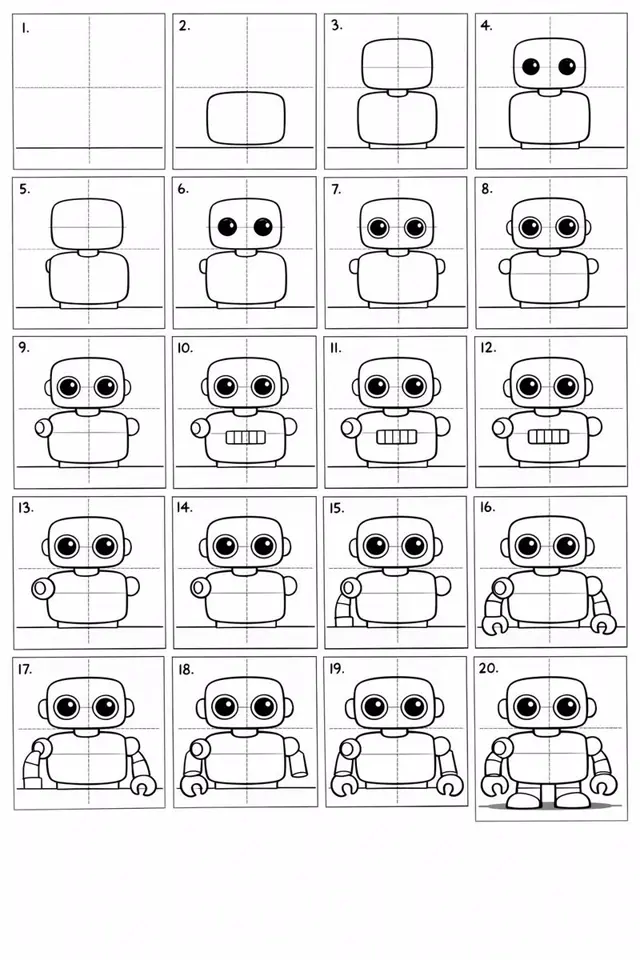
可愛卡通機器人繪製步驟指南,從基本形狀開始,逐步添加眼睛、嘴巴和四肢等細節
提示詞
Create a 20-panel layout guide for drawing a cute cartoon robot. Each panel keeps everything from before and adds one clear change.

1. Light guide lines: vertical center, horizontal center, and a ground line.
2. Add torso: rounded rectangle above the ground.
3. Add torso centerline.
4. Add head: smaller rounded square above torso.
5. Add neck connector: short rounded block.
6. Add left eye circle.
7. Add right eye circle.
8. Add pupils inside both eyes.
9. Add thin rim rings around both eyes.
10. Add mouth rectangle below eyes.
11. Add evenly spaced vertical slats in the mouth.
12. Add left shoulder joint circle on torso side.
13. Add right shoulder joint circle.
14. Add left upper arm cylinder from left shoulder.
15. Add left elbow circle and left forearm cylinder.
16. Add left claw hand (base curve + two prongs).
17. Add right upper arm cylinder from right shoulder.
18. Add right elbow circle and right forearm cylinder.
19. Add right claw hand to match left.
20. Add legs and feet as simple blocks: two short legs from torso bottom and two rounded trapezoid feet, plus a small ground shadow.
此提示詞的權利屬於作者 @umesh_ai。任何商業使用(推廣 AI 工具、聚合平台、Telegram 機器人)由你自行負責,mozgi.io 不承擔任何責任。 詳情 →